
Apparity will identify key metrics and evaluate structural elements (e.g. macros, external links, etc.) to assign a Structural Complexity rating to the file. Typically, Structural Complexity ratings are assigned during the Discovery process. However, a user can also leverage this feature directly in an Excel workbook. The risk algorithm used to calculate this rating is unique to your organization.
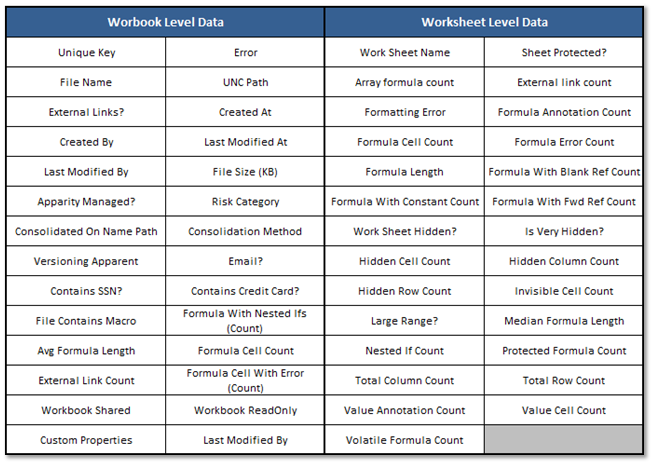
The following workbook and worksheet level attributes that go into this algorithm are listed below:
Structural Complexity Attributes
To Find the Structural Complexity in Excel
1. Open the Excel workbook and click on the Apparity tab.
2. In the Apparity Ribbon, click on the Find Structural Complexity icon.
Find Structural Complexity Icon

3. A pop-up will appear. Click on Compute to continue.
4. Once completed, a summary page will appear. It will assign a Structural Complexity rating to the file (High, Medium or Low), and it will display the key metrics and structural attributes that were detected.