
Certain features are not supported by Apparity and must be addressed before onboarding the file. For optimal performance, complete each applicable task outlined below.
1. Ensure workbook-level protection is compatible with Apparity.
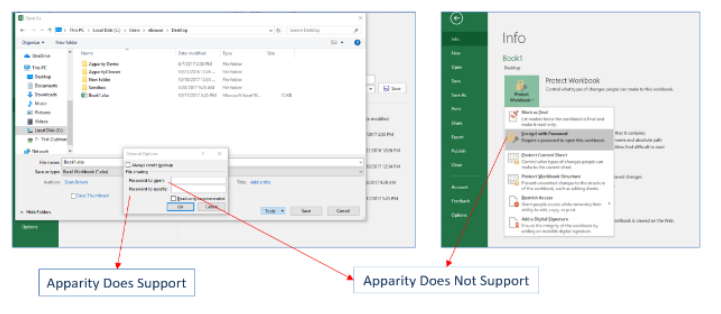
- There is an Apparity-compatible method of preventing modifications at the workbook level. See the image below for details.
Apparity Compatibility with Workbook Password Protection
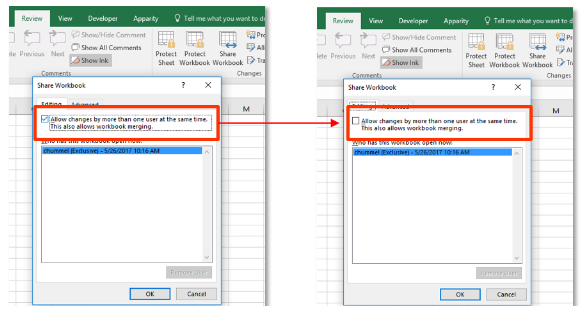
2. Turn off Shared Workbook functionality.
- This can be turned back on post-onboard.
Turn Off Shared Workbook Functionality
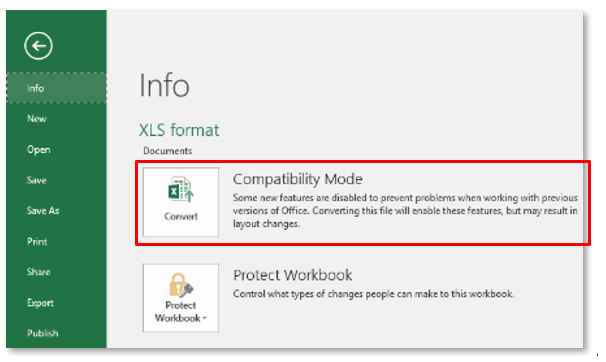
3. Convert Excel 97- Excel 2003 files (.xls, .xlm) to the latest supported file format (.xlsx, .xlsm).
Convert Unsupported Excel Files
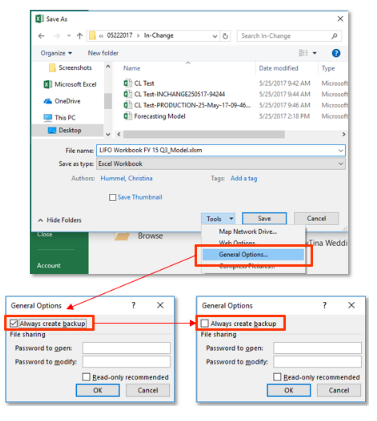
4. Remove .xlk backup settings
Remove .xlk Backup
In addition to the four items above, we also recommend running the Excess Formatting Analyzer to eliminate unnecessary file bloating prior to onboarding. Click here to learn more about this useful feature.